As we wrap up 2024 and look ahead to 2025, many of us are doing year-end reviews – not just of our accomplishments, but also of our AWS bills. If you’re like most teams, you’ve probably had at least one “billing surprise” this year that made you question your cloud architecture decisions. Today, on this last day of the year, I want to share insights about one of the most common culprits: AWS NAT Gateway costs.
Picture this: You’re reviewing your monthly AWS bill in Cost Explorer, expecting the usual suspects – EC2 instances, RDS databases, maybe some S3 storage. You notice a significant charge under “EC2-Other” that makes you do a double-take. $500, $1000, sometimes more. But here’s the thing – “EC2-Other” is actually a collection of various services, not just one culprit.
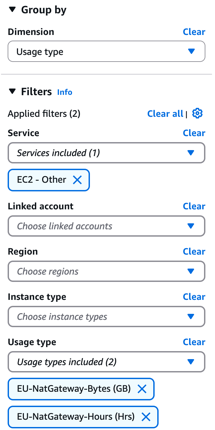
The real detective work begins when you change the dimension from “Service” to “Usage Type.” Suddenly, the mystery unravels. You see line items like “EU-NatGateway-Hours” and “EU-NatGateway-Bytes” (or US-NatGateway if you’re in US regions). If you’re not familiar with NAT Gateway, your first reaction is probably “What the hell is a NAT Gateway, and why is it costing me so much?”
Switching to “Usage Type” dimension reveals the true culprit: NAT Gateway hours and data processing charges:
I’ve been there. We’ve all been there. And after years of working with AWS, I can tell you that NAT Gateway can bring big billing surprises – and cost savings opportunities – for your AWS cloud infrastructure.
What Is a NAT Gateway (And Why Do You Need It)?
Let’s start with the basics. NAT stands for Network Address Translation, and in the AWS world, a NAT Gateway serves a very specific purpose: it allows resources in your private subnets to access the internet while keeping them hidden from inbound internet traffic.
Think of it as a one-way door. Your private EC2 instances, Lambda functions, or RDS databases can reach out to download updates, call external APIs, or send notifications, but the internet can’t reach back in to them directly. This is fundamental to AWS security best practices – you want your databases and internal services in private subnets, but they still need occasional internet access.
The Architecture Reality
Here’s where it gets interesting (and expensive). AWS recommends deploying NAT Gateways in multiple Availability Zones for high availability. So if you’re following best practices in a typical 3-AZ setup, you’re looking at three NAT Gateways right off the bat.
Each NAT Gateway costs $0.045 per hour (as of 2025), which works out to about $32.40 per month per gateway. That’s nearly $100 per month just for the gateways themselves, before you even consider data processing charges.
The Billing Shock: Where Costs Hide
This is where teams get blindsided. The NAT Gateway costs show up under “EC2-Other” in your Cost Explorer, not under a clearly labeled “Networking” category. I’ve seen countless teams spend hours trying to figure out why their EC2 costs were so high, only to discover it wasn’t their instances at all – it was the network infrastructure supporting them.
The Two-Part Pricing Model
NAT Gateway billing has two components:
- Hourly charges: $0.045 per hour per gateway (about $32.40/month)
- Data processing charges: $0.045 per GB of data processed
That second part is the real kicker. Every byte that flows through your NAT Gateway – software updates, API calls, file transfer - gets charged. In data-heavy environments, this can easily become the larger cost component.
High Availability vs. Cost: The Trade-off
AWS best practices recommend NAT Gateways in multiple AZs for high availability. But here’s the question every team needs to ask: Do you actually need that level of availability for all your workloads?
Traditional Multi-AZ NAT Gateway Setup
Historically, achieving high availability meant manually deploying NAT Gateways in each Availability Zone where you had private subnets. This approach ensures that if one AZ fails, your other AZs can continue operating independently without cross-AZ dependencies.
Regional NAT Gateways: A New Option
AWS recently introduced Regional NAT Gateways, which offer automatic multi-AZ expansion and failover capabilities. Instead of managing individual NAT Gateways per AZ, you can deploy a single Regional NAT Gateway that automatically scales across multiple AZs within a region.
Key benefits of Regional NAT Gateways:
- Automatic failover – AWS handles AZ-level failures transparently
- Simplified management – One gateway instead of multiple per-AZ gateways
- Dynamic scaling – Automatically expands to additional AZs as needed
- Cost optimization potential – Can reduce the number of gateways you need to manage
Cost considerations: While Regional NAT Gateways can simplify architecture, they don’t necessarily reduce costs in all scenarios. You’re still paying for the underlying infrastructure, but the billing model may be more predictable. The real cost savings come from operational simplicity and the ability to right-size your NAT capacity more effectively.
When to consider Regional NAT Gateways:
- Dynamic workloads that may expand to new AZs
- Simplified operations are a priority over granular cost control
- Consistent traffic patterns across multiple AZs
- Teams that want AWS-managed high availability without manual setup
When You Need High Availability
- Production environments with strict uptime requirements
- Multi-AZ applications where cross-AZ data transfer costs would be significant
- Compliance requirements that mandate high availability
When One Might Be Enough
- Development and staging environments where brief outages are acceptable
- Batch processing workloads that can tolerate delays
- Cost-sensitive environments where the trade-off makes business sense
The math is simple with traditional NAT Gateways: going from three NAT Gateways to one saves you about $65/month in hourly charges alone, plus the data processing costs for the reduced traffic distribution. With Regional NAT Gateways, the calculation becomes more about operational efficiency versus granular cost control.
NAT Instance vs. NAT Gateway: The Old Debate
Before NAT Gateways existed, we used NAT Instances – regular EC2 instances configured to perform network address translation. AWS introduced NAT Gateways as a managed service to eliminate the operational overhead, but the cost difference can be significant.
NAT Gateway Advantages
- Fully managed – no patching, no maintenance
- High availability within an AZ
- Better performance – up to 45 Gbps bandwidth
- No security group management required
NAT Instance Advantages
- Cost control – use smaller instance types for lower traffic
- Flexibility – can run additional services on the same instance
- Spot instance compatibility – potentially massive savings
- Custom configurations – advanced routing, monitoring, etc.
For many workloads, especially in non-production environments, a t3.nano NAT instance at $3.80/month (plus data transfer) makes a lot more sense than a $32.40/month NAT Gateway.
When You Don’t Need NAT Gateway At All
Here’s the biggest cost optimization opportunity: understanding when you don’t need internet access from private subnets at all.
VPC Endpoints: The Game Changer
If your private resources only need to access AWS services (S3, DynamoDB, SQS, etc.), VPC Endpoints can eliminate NAT Gateway requirements entirely. Instead of routing through the internet, traffic goes directly through AWS’s internal network.
I have seen monthly AWS bills reduce by $400, simply by implementing S3 VPC Endpoints. Where compute services were uploading processed files to S3 through NAT Gateways – completely unnecessary once a VPC endpoint is set up.
VPC PrivateLink: Beyond AWS Services
While VPC Endpoints handle AWS services, VPC PrivateLink opens up even more possibilities for eliminating NAT Gateway dependencies. PrivateLink allows you to privately connect your VPC to third-party services, SaaS applications, and services in other AWS accounts without routing traffic over the internet.
Common PrivateLink use cases that reduce NAT Gateway costs:
- Third-party SaaS integrations – Connect to services like Snowflake, Databricks, or MongoDB Atlas privately
- Cross-account service access – Access services in other AWS accounts without internet routing
- Partner integrations – Many AWS partners now offer PrivateLink endpoints for their services
- Marketplace services – Growing number of AWS Marketplace solutions support PrivateLink
The cost equation changes significantly when you can replace internet-bound traffic with PrivateLink connections. While PrivateLink has its own pricing (typically $0.01 per hour per endpoint plus data processing charges), it’s often more cost-effective than NAT Gateway for high-volume integrations, especially when you factor in the security and performance benefits.
For example, if you’re processing large datasets with a third-party analytics service, routing that traffic through PrivateLink instead of NAT Gateway can result in:
- Lower data processing costs (PrivateLink is often cheaper per GB)
- Better performance (no internet routing)
- Enhanced security (traffic never leaves AWS backbone)
- Potential elimination of entire NAT Gateways if that was the primary use case
Common Scenarios Where NAT Gateway Isn’t Needed
- Database-only private subnets that don’t require internet access
- Internal microservices that only communicate within the VPC
- Batch processing that only interacts with AWS services
- Container workloads using AWS service integrations
Practical Cost Optimization Strategies
Based on years of AWS cost optimization work, here are the strategies that deliver the biggest impact:
1. Audit Your Internet Dependencies
Start by understanding what actually needs internet access. Use VPC Flow Logs to analyze traffic patterns. You might be surprised how much traffic is going to AWS services that could use VPC Endpoints instead.
2. Consolidate Where Possible
If you have multiple private subnets in the same AZ all using the same NAT Gateway, consider whether you can consolidate workloads or redesign your network topology.
3. Environment-Specific Strategies
- Production: Follow AWS best practices with multi-AZ NAT Gateways
- Staging: Consider single NAT Gateway or NAT Instance
- Development: NAT Instance or even shared internet access patterns
4. Monitor and Alert
Set up AWS Budgets specifically for NAT Gateway costs. I recommend alerts at 50% and 80% of your expected monthly spend. The earlier you catch cost spikes, the easier they are to address.
5. Regular Architecture Reviews
NAT Gateway requirements change as applications evolve. What made sense six months ago might not make sense today. Schedule quarterly reviews of your network architecture and costs.
The Real-World Impact
Lets look at a specific example that illustrates the potential savings. A SaaS company running a typical three-tier application across three AZs. Their initial setup includes:
- 3 NAT Gateways for high availability
- Heavy API integration traffic
- Development environments mirroring production
Original monthly cost: ~$850 for NAT Gateway infrastructure
After optimization:
- Production: Kept 3 NAT Gateways (business requirement)
- Staging: Moved to single NAT Gateway
- Development: Implemented NAT Instance with Spot pricing
- Added VPC Endpoints for S3 and DynamoDB access
New monthly cost: ~$320
Annual savings: Over $6,000, with no impact on production availability or performance
Monitoring Your NAT Gateway Costs
The key to managing NAT Gateway costs is visibility. Here’s how to set up proper monitoring:
Cost Explorer Filters
- Navigate to Cost Explorer
- Filter by Service: “Amazon Elastic Compute Cloud - Compute”
- Group by “Usage Type”
- Look for items containing “NatGateway”
This will show you both the hourly charges and data processing costs separately.
CloudWatch Metrics
Monitor these key NAT Gateway metrics to understand traffic patterns and costs:
BytesInFromDestination– Bytes received by the NAT gateway from the internet destination (response traffic)BytesOutToDestination– Bytes sent out through the NAT gateway to the internet destination (outbound traffic from your VPC)BytesInFromSource– Bytes received by the NAT gateway from clients in your VPC (requests from private resources)BytesOutToSource– Bytes sent through the NAT gateway back to clients in your VPC (response traffic to private resources)ActiveConnectionCount– Total number of concurrent active TCP connections through the NAT gatewayConnectionAttemptCount– Number of connection attempts made through the NAT gatewayPacketDropCount– Number of packets dropped by the NAT gateway
Key insights for cost optimization:
- High
BytesOutToDestinationvalues indicate significant outbound internet traffic (directly impacts data processing charges) - Compare
BytesInFromSourcevsBytesOutToDestinationto identify potential data loss or processing issues - Use
ActiveConnectionCountto understand connection patterns and right-size your NAT Gateway capacity
CloudWatch delivers NAT Gateway metrics at 1-minute intervals and retains data for 15 months, making it perfect for both real-time monitoring and long-term cost trend analysis.
AWS Budgets Setup
Create a specific budget for NAT Gateway costs:
- Budget type: Cost budget
- Service: EC2-Other
- Usage Type: Include NAT Gateway related usage types
- Set alerts at meaningful thresholds
Looking Forward: Emerging Alternatives
AWS continues to evolve its networking services. Keep an eye on:
- IPv6 adoption – can eliminate some NAT requirements
- New VPC Endpoint services – expanding coverage of AWS services
- AWS PrivateLink – for third-party service access without internet routing
The Bottom Line
NAT Gateway costs don’t have to be a surprise. With proper understanding, monitoring, and architectural decisions, you can balance security, availability, and cost effectively.
The key is to be intentional about your network design. Don’t just follow the default patterns – understand your actual requirements and optimize accordingly. Your CFO will thank you, and your architecture will be more robust for the thought you’ve put into it.
Remember: the best cost optimization is the one that doesn’t compromise your application’s requirements. But in my experience, most teams are over-provisioned for NAT Gateway capacity, and there’s almost always room for optimization without sacrificing functionality.
Key Takeaways
- Understand the billing model – hourly charges plus data processing fees
- Question high availability requirements – not every environment needs multi-AZ NAT Gateways
- Consider NAT Instances for cost-sensitive, low-traffic scenarios
- Implement VPC Endpoints where possible to eliminate internet routing
- Monitor costs proactively with proper budgets and alerts
- Review architecture regularly as requirements change
The cloud’s promise is paying only for what you use. With NAT Gateways, make sure you’re using only what you actually need.
Have you encountered surprising NAT Gateway costs in your AWS environment? I’d love to hear about your experiences and optimization strategies. Feel free to reach out through the contact page – sharing knowledge is how we all get better at this.
As we step into 2026, here’s to smarter cloud architectures, optimized costs, and continued learning together. Happy New Year! 🎉