Background
Welcome to the first post in my Strands Agents series. I’m glad to have you onboard this journey.
The first time I came across Strands Agents was some time after the summer of 2025. It was at the office, on the day after an AWS event in Oslo. A colleague of mine had stayed for some beers, and some of the AWS employees had brought up Strands Agents on their computer to show how easy it was to set up and build something. I had left the venue, but my colleague thankfully showed me what he had created after he got home, and gave me a tl;dr of the docs and setup. After work that day I beelined to the computer, eager to dig my teeth into Strands Agents and start building. Getting started was as easy as it could be, and shortly I was able to do operations targeting my AWS account by entering a natural language prompt into my terminal. I was surprised by how easy it was, and the right side of my brain was working in full gear. Luckily the left side of my brain put on the breaks, and steered me to the documentation. I had to understand the framework, its capabilities and boundaries.
In this series I will share what I’ve learned along the way, and the challenges I’ve faced, as well as patterns, use cases and other aspects of Strands Agents.
But before we dive into the framework itself, let’s start with the basics. What exactly is an AI agent, and what makes it different from a regular program? Understanding the building blocks will make it easier to understand how Strands Agents brings them together.
What is an agent?
Taking the approach of a simple definition, an agent is a recipe with three ingredients:
- A prompt
- A model
- Tools
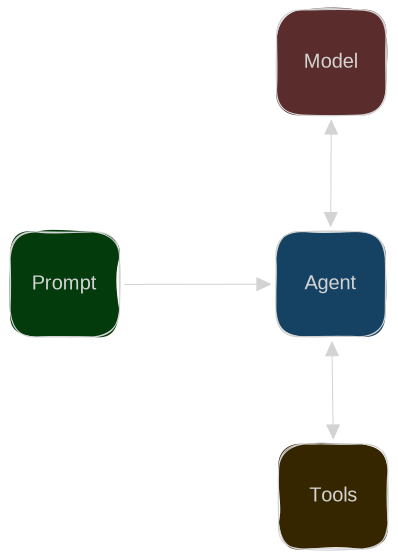
By combining this three ingredients we can whip up an agent. A smart computer program capable of planning and thinking ahead, taking action and making decisions and learning from results in order to improve over time. All with the objective of completing a task, autonomously or with a human in the loop.
The agent’s task could be to answer a question, summarize text, generate code, plan a trip, or optimize a specific workflow.
The prompt
The prompt is a natural language text that defines the agent’s task. Either as user input, general instructions hard coded into the agent (AKA. system prompt) or a combination of both. The prompt can also include examples, directions and suggestions that guide the agent towards the desired result.
The model
The model refers to a large language model, responsible for processing input and generating output. The model interprets instructions, understands context, reasons about a task, and generates responses or decides which actions to take. Models differ in performance, speed and cost, making the choice of model an important consideration when designing your agent. I prefer experimenting with different models and comparing their result, this can often help you find a model fit for the task, as well as your budget.
Tools
Tools define the agent’s capabilities and what it can do to complete the task at hand. This could for example include the ability to read or write files, execute the terminal or code, call an API or interact with 3rd-party services over the Model Context Protocol (MCP). Since MCP is an open source standard that is broadly adopted and utilized, there’s probably already an MCP server you can integrate into your agent, or you can create one if you can’t find one that provides what you need. The possibilities are many!
The agent loop
An agent interacts with its model to determine what to do next, including when and which tools to use. The results of tool calls are fed back into the model, which uses them to decide how to proceed. This continues until the task is completed or the agent reaches a stopping condition, such as a configured limit or an error. This process is known as the agent loop.
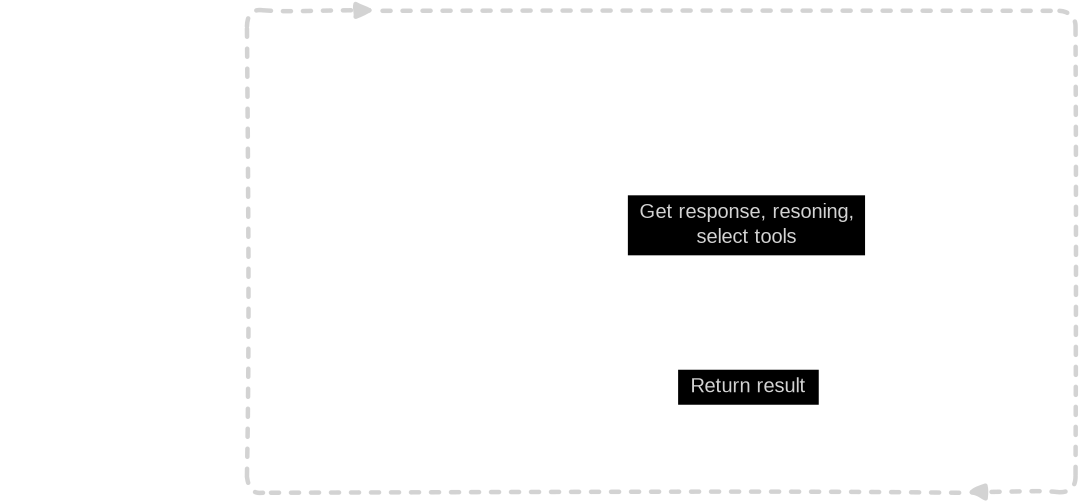
A simpler alternative to an iterative agent loop is a single model call. This can be sufficient for simple questions, if the answer to the question is part of the models training data. However, the model cannot fetch current information or use external tools unless these capabilities are provided. It also has no opportunity to check the results of its actions or adjust its approach along the way. This means that if the model makes a mistake during its reasoning, it has no further steps to revisit or correct it before producing the final answer.
Model driven approach
A model-driven agent loop means that the model decides what steps to take and which tools to use in order to accomplish the task.
Let’s say you ask an agent to investigate an issue in your application. The agent could start by searching through the logs, use the results to decide what to investigate next, and continue until it has enough information to suggest a solution. The steps are not defined in advance, but determined by the model based on the task and the results it receives along the way.
This gives us the flexibility to build agents that can handle different tasks without having to define every possible sequence of steps beforehand.
The harness
The harness is the last concept I want to cover before we get started with Strands Agents. It’s another buzzword that often gets thrown into the mix without a proper definition, and it took me some time to grasp. But I found an easy-to-digest way of thinking about it: the agent operates within the harness, and the harness is everything that’s left if you remove the model from the agent.
The harness is responsible for the agent’s operational concerns, allowing the model to focus on reasoning and deciding what to do next. Without a harness to handle these concerns, the model would have to deal with them itself, potentially interfering with its ability to focus on the given task.
The harness takes care of:
- Tool provisioning
- This could for instance be access to search the web or files, execute code, call APIs and interact with other capabilities and more.
- Context management
- Managing conversation history, memory across sessions and context compaction for optimizing token consumption.
- Workflow
- Keeping track of tasks, progress and checkpoints.
- Reliability
- Saving progress, handling errors and recovering from failures.”
- Guardrails
- Enforcing safety constraints, validating outputs and steering the agent’s behavior.
Getting started with Strands Agents
Now that we have covered the basics of agents, let’s get more specific and take a look at Strands Agents itself.
What is Strands Agents?
Strands Agents is an open source SDK for building AI agents, released by AWS back in May 2025. I know… In the AI era, that feels like a long time. To understand Strands Agents and how you can use it to your advantage, it’s essential to understand what an AI agent is.
Strands Agents SDK helps us build agents without having to implement the entire agent loop and tool execution logic ourselves. It was initially released for Python, but now also supports TypeScript, so you can use the language that best fits your project. I would love to see Go support in the Strands Agents SDK, but if I had to bet, I’d put my money on Java being next in line for additional language support.
One of the things I really like about Strands Agents is that it’s model-provider agnostic. You’re not locked into a single provider, you can use models from OpenAI, Anthropic and Google, as well as Amazon Bedrock or even local models running through Ollama.
This gives you the flexibility to experiment with different models and compare their results, speed and cost without having to rebuild your agent from scratch. You can also mix and match providers depending on your needs.
And if you prefer to keep things local, you can run your agent using a local model without an internet connection, as long as you’ve already downloaded the model and don’t rely on external services for tools or other functionality. This opens up some interesting possibilities for experimentation and for running agents in environments where you want to keep things local.
Exploring the Strands ecosystem
When visiting the Strands Agents website, you’ll find several projects and components, each serving a different purpose. If you’re new to Strands Agents, it can be a little overwhelming to know where to start, so lets take a closer look at the different projects and what they are intended for, so you know where to start and what to look into when you need it.
Strands harness
The Strands harness is a fully assembled agent harness with optimized defaults for the system prompt, tools, memory, sessions and context management. Instead of having to wire everything together yourself, you get a more complete starting point that you can customize to fit your needs.
You can use it through the CLI or as a library in Python or TypeScript. And if you need more control, you can replace the defaults or go deeper into the underlying components without having to start over.
Harness SDK
If you prefer to build your own agent harness from the ground up, the Strands Harness SDK gives you the building blocks to do so. It runs the agent loop and provides components for tools, model providers, memory, sessions and hooks, while leaving the decisions about how they fit together up to you.
You can connect tools or integrate MCP servers, and choose between different model providers without having to rewrite the rest of your application.
Strands Box
Strands Box focuses on the security of agent execution. It runs agents inside an operating-system-enforced sandbox and uses Dogwood policies to control actions such as shell commands, file operations, network requests and MCP calls.
One interesting feature is that its policies can take previous actions into account. For example, you could allow an agent to push changes to Git only after the tests have passed. Box is currently in preview, so check the documentation, pin the version if you decide to use it or you should expect breaking changes.
Strands Shell
Strands Shell provides a Bourne-compatible shell that runs inside your own process. Rather than launching operating-system processes for every command, it implements a range of Unix commands in-process.
You can define which files, URLs and credentials the shell can access, keeping everything else outside the agent’s reach. It can be embedded directly in Python or Node.js applications, or accessed through its built-in MCP server.
Strands Evals
Building an agent is one thing, but how do you know whether it behaves as expected? Strands Evals helps you validate an agent before shipping it by scoring its outputs and execution trajectory, diagnosing failures, and simulating users and tools.
This makes it possible to evaluate not only the final answer, but also how the agent reached it, including its tool selection, task success and safety.
Strands Labs
Strands Labs is the experimental arm of Strands Agents. It explores new use cases and research areas using the Strands Harness SDK, including robotics, world models and agent benchmarks.
These projects evolve more quickly than the core SDK, so expect more frequent changes and newer integrations. Some may eventually become part of the core SDK, while others remain experimental.
Conclusion
I’m glad you made it to the end!
Now that we’ve established some common ground for the rest of this series, I think this is a good place to wrap things up. We’ve covered the fundamentals of AI agents, how the agent loop works, the role of the harness, and what Strands offers.
I hope this has given you a clearer understanding of the framework and its capabilities, so you can focus on exploring ideas and designing your agents rather than wondering how the framework works or what it can do.
In the next post, we’ll get our hands dirty. We’ll set up our environment, install Strands Agents, and start building our first agent. I hope you’ll join me!
Thanks for reading!