
Welcome back, and glad to see you here in the second post of my Strands Agents series! In the first post we kept things at a conceptual level, and covered what an AI agent is and what Strands Agents brings to the table. Now it’s time to get our hands dirty. We’ll install Strands Agents, build our first agent, and give it tools so it can fetch live data. We’ll use the Strands Agents harness so we can see results quickly.
I’ve created a GitHub repository that I’ll use for the labs throughout the series. You’ll also find other useful information about Strands Agents and the labs there.
Strands Agents labs GitHub repository
Strands Agents supports both Python and TypeScript, so the repository has labs in both languages and you can follow along in the one you prefer. But let’s not get ahead of ourselves. First we’ll set up our environment and install Strands Agents.
Install Strands Agents
Python projects
You need Python 3.10 or later. It is good practice to install into a virtual environment, so create and activate one first:
python3 -m venv .venv
source .venv/bin/activate   # Windows: .venv\Scripts\activate
Then install the Strands Agents SDK:
pip install strands-agents
If you prefer uv, it works as well. uv creates the virtual environment and manages dependencies for you:
uv init my-agent && cd my-agent
uv add strands-agents
TypeScript projects
You need Node.js 20 or later. In a new or existing project, install the SDK:
npm install @strands-agents/sdk
The SDK is a regular npm package, so any Node package manager works:
pnpm add @strands-agents/sdk
yarn add @strands-agents/sdk
bun add @strands-agents/sdk
Our first agent
With Strands Agents installed, the simplest agent we can build is just a few lines. No tools, no configuration. We don’t specify a model either, so Strands falls back to its default model provider, Amazon Bedrock. That means you need AWS credentials configured and model access enabled in the Bedrock console.
The labs for this are in 01-hello-agent. The script takes a prompt as an argument, and falls back to a default prompt if you don’t pass one.
Python
First we import sys to read the command line arguments, and the Agent class from Strands. If no prompt is passed to the script, we fall back to a default prompt:
import sys

from strands import Agent

DEFAULT_PROMPT = "What is Lisbon known for, in one sentence?"

prompt = " ".join(sys.argv[1:]) or DEFAULT_PROMPT
Then we create the agent and call it with the prompt. Calling the agent runs the agent loop, and Strands prints the answer to the terminal as it streams in from the model:
agent = Agent()
agent(prompt)
See the full example in the labs repository.
TypeScript
In TypeScript we import the Agent class from the SDK, and read the prompt from process.argv, with the same fallback to a default prompt:
import { Agent } from '@strands-agents/sdk';

const DEFAULT_PROMPT = 'What is Lisbon known for, in one sentence?';

const prompt = process.argv.slice(2).join(' ') || DEFAULT_PROMPT;
Then we create the agent and invoke it. Just like in Python, Strands prints the answer for us:
const agent = new Agent();
await agent.invoke(prompt);
See the full example in the labs repository.
Run it without any arguments and the agent answers the default prompt:
python main.py          # Python
npm start               # TypeScript
This is the output I got from the Python version:
Lisbon is known for its historic neighborhoods, iconic yellow trams, stunning hilltop viewpoints, vibrant culture, and as the sun-drenched capital of Portugal perched along the Tagus River.
Ask it anything
Since the script takes a prompt as an argument, we can ask the agent anything we like. Let’s stay in Portugal and try a general knowledge question:
python main.py "What currency do they use in Portugal, and what language do they speak?"          # Python
npm start -- "What currency do they use in Portugal, and what language do they speak?"            # TypeScript
In Portugal, they use the Euro (€) as their currency, which they adopted in 2002 when they replaced the former escudo.
The official language of Portugal is Portuguese (Português), which is also spoken by hundreds of millions of people worldwide, including in Brazil, Angola, Mozambique, and several other countries.
The agent answers correctly, and that is no surprise. This is something the model learned during training, so it can answer straight from what it already knows.
Asking for something the model can’t know
Now let’s ask about Lisbon again, but this time something that changes by the hour:
python main.py "What is the weather in Lisbon right now?"          # Python
npm start -- "What is the weather in Lisbon right now?"            # TypeScript
I don’t have the ability to access real-time data, including current weather conditions. I can’t browse the internet or check live weather services.
To find the current weather in Lisbon, I’d suggest:
- Weather websites: weather.com, accuweather.com, or timeanddate.com
- Search engines: Just type “Lisbon weather” in Google or Bing
- Weather apps: Like Weather Channel, Dark Sky, or your phone’s built-in weather app
These will give you accurate, up-to-date information! 🌤️
Here we hit the limit. I like that the model is honest and tells us it can’t help, but it still sends us off to do the work ourselves. Other models might do worse and make up a plausible sounding forecast. Either way, on its own the model is limited to what it learned during training. It can’t look anything up, and it can’t check what is happening right now.
An agent becomes useful when it can reach outside of the model and act on the world. In the next lab we’ll fix this by giving our agent a tool: a function that calls a free weather API, so the agent can fetch the real weather in Lisbon.
Giving our agent a tool
A tool is just a function the agent is allowed to call. We describe what the function does and what input it takes, and the model decides on its own when it needs it. Strands takes care of the rest: it passes the tool description to the model, runs the function when the model asks for it, and sends the result back to the model so it can write the final answer. This back and forth is the agent loop we talked about in the first post.

For the weather we use Open-Meteo, a free weather API that doesn’t require an API key. Our tool does two calls: first it looks up the coordinates of the city, then it fetches the current weather for those coordinates.
The labs for this are in 02-weather-tool.
Python
We use httpx for the HTTP calls, so let’s install it next to Strands:
pip install strands-agents httpx
Besides Agent, we now also import the tool decorator from Strands. We also import httpx, and create a small helper function that calls a URL with some query parameters and returns the response as JSON:
import json
import sys

import httpx
from strands import Agent, tool


def fetch_json(url: str, params: dict) -> dict:
    return httpx.get(url, params=params).raise_for_status().json()
In Python a tool is a regular function with the @tool decorator. Strands reads the function name, the type hints and the docstring, and uses them to describe the tool to the model. The model reads the docstring to understand when and how to use the tool, so it is worth writing carefully:
@tool
def get_weather(city: str) -> str:
    """Get the current weather for a city.

    Args:
        city: The name of the city, e.g. Lisbon.
    """
Inside the tool we do the two calls to Open-Meteo. First we look up the coordinates of the city with the geocoding API. If the city can’t be found, we return a message saying so, the model will read that message just like any other tool result:
    places = fetch_json(
        "https://geocoding-api.open-meteo.com/v1/search", {"name": city, "count": 1}
    ).get("results")
    if not places:
        return f"Could not find a city named {city}."
    place = places[0]
Then we fetch the current weather for those coordinates, and return it as a JSON string. We don’t need to format the data in any special way, the model is good at reading JSON:
    weather = fetch_json(
        "https://api.open-meteo.com/v1/forecast",
        {
            "latitude": place["latitude"],
            "longitude": place["longitude"],
            "current": "temperature_2m,precipitation,weather_code,wind_speed_10m",
            "timezone": "auto",
        },
    )
    return json.dumps(
        {"city": place["name"], "country": place.get("country"), **weather}
    )
Finally, we pass the tool to the agent when we create it:
agent = Agent(tools=[get_weather])
agent(prompt)
See the full example in the labs repository.
TypeScript
In TypeScript we define the tool’s input with Zod, so let’s install it next to the SDK:
npm install @strands-agents/sdk zod
We import tool from the SDK along with Agent, and z from Zod. Node.js has fetch built in, so we don’t need an extra package for the HTTP calls. We create a small helper function that calls a URL with some query parameters and returns the response as JSON:
import { Agent, tool } from '@strands-agents/sdk';
import { z } from 'zod';

async function fetchJson(url: string, params: Record<string, string | number>) {
  const query = new URLSearchParams(Object.entries(params).map(([k, v]) => [k, String(v)]));
  const response = await fetch(`${url}?${query}`);
  return response.json();
}
In TypeScript we create the tool with the tool function. We give it a name and a description, and an input schema that describes the input the tool takes. Just like the docstring in Python, this is what the model reads to understand when and how to use the tool:
const getWeather = tool({
  name: 'get_weather',
  description: 'Get the current weather for a city.',
  inputSchema: z.object({
    city: z.string().describe('The name of the city, e.g. Lisbon.'),
  }),
The callback is the function that does the actual work, and Strands calls it with the input the model asked for. Just like in Python, we first look up the coordinates of the city, then fetch the current weather for those coordinates, and return it as a JSON string:
  callback: async ({ city }) => {
    const { results } = await fetchJson('https://geocoding-api.open-meteo.com/v1/search', {
      name: city,
      count: 1,
    })
    if (!results?.length) return `Could not find a city named ${city}.`
    const place = results[0]

    const weather = await fetchJson('https://api.open-meteo.com/v1/forecast', {
      latitude: place.latitude,
      longitude: place.longitude,
      current: 'temperature_2m,precipitation,weather_code,wind_speed_10m',
      timezone: 'auto',
    })
    return JSON.stringify({ city: place.name, country: place.country, ...weather })
  },
})
Finally, we pass the tool to the agent when we create it:
const agent = new Agent({ tools: [getWeather] });
await agent.invoke(prompt);
See the full example in the labs repository.
The only change to the agent itself is that we pass the tool in when we create it. Everything else is the same as in our first agent.
Asking about the weather again
The default prompt is now the same weather question that our first agent couldn’t answer, so let’s run it without any arguments:
python main.py          # Python
npm start               # TypeScript
Tool #1: get_weather Here’s the current weather in Lisbon, Portugal 🇵🇹:
- 🌤️ Condition: Mainly clear
- 🌡️ Temperature: 19.0°C
- 🌧️ Precipitation: 0.0 mm
- 💨 Wind Speed: 14.7 km/h
It looks like a pleasant day in Lisbon! Let me know if you need any more information.
This time the agent doesn’t tell us to check a weather website. The Tool #1: get_weather line is Strands telling us that the agent called our tool. The model saw that it had a get_weather tool, called it with Lisbon as the city, got the real weather data back from Open-Meteo, and turned it into an answer.
Since the model decides when to use the tool, we don’t have to ask about the weather directly. Try something like:
python main.py "Should I wear shorts in Lisbon today?"          # Python
npm start -- "Should I wear shorts in Lisbon today?"            # TypeScript
Let me check the current weather in Lisbon for you! Tool #1: get_weather Here’s the current weather in Lisbon:
- 🌤️ Condition: Mainly clear
- 🌡️ Temperature: 19°C (66°F)
- 🌧️ Precipitation: None
- 💨 Wind Speed: 14.7 km/h
It’s a pleasant and dry day, but 19°C is a bit on the mild/cool side. Whether to wear shorts depends on your personal preference:
- If you run warm or plan to be active, shorts could work just fine!
- If you’re sensitive to cooler temperatures, you might prefer light trousers or jeans, especially with the light breeze.
A good middle ground could be shorts paired with a light jacket or layer. Enjoy Lisbon! 🌞
We never told the agent how to answer that question. It figures out on its own that it needs the weather in Lisbon, calls the tool, and uses the result to answer. With a single function, our agent went from “I don’t have access to real-time data” to answering with live data.
The agent is limited by its tools
Our weather tool works, so let’s push it a bit. What happens if we ask about the weekend instead?
python main.py "What is the weather forecast for Lisbon this weekend?"          # Python
npm start -- "What is the weather forecast for Lisbon this weekend?"            # TypeScript
Let me check the current weather in Lisbon for you right away! Tool #1: get_weather Here’s the current weather for Lisbon, Portugal:
- 🌤️ Conditions: Mainly clear skies
- 🌡️ Temperature: 19°C
- 🌧️ Precipitation: 0.0 mm (no rain)
- 💨 Wind Speed: 14.7 km/h
Please note that this tool only provides current weather conditions, not a weekend forecast. For a detailed weekend forecast, I’d recommend checking a dedicated weather service such as weather.com, AccuWeather, or Time and Date for Lisbon. That said, based on current conditions, Lisbon is looking pleasant! 🌞
Look at the first line: “Let me check the current weather”. The model knows our tool only gives the weather right now, because that is what the tool’s description says. It is the only tool it has, so it uses it anyway, and then it is honest about it: the tool only provides current conditions, not a forecast.
The model is not always that honest. Let’s ask a question that depends on the weekend weather, without asking for a forecast directly:
python main.py "Should I pack an umbrella for my trip to Lisbon this weekend?"          # Python
npm start -- "Should I pack an umbrella for my trip to Lisbon this weekend?"            # TypeScript
Let me check the current weather in Lisbon for you! Tool #1: get_weather Based on the current weather in Lisbon, here’s what I can tell you:
- 🌤️ Conditions: Mainly clear skies
- 🌡️ Temperature: 19°C (66°F)
- 🌧️ Precipitation: 0.0 mm (no rain right now)
- 💨 Wind Speed: 14.7 km/h
Right now, Lisbon is looking quite pleasant with clear skies and no precipitation! An umbrella may not be strictly necessary, but it’s always a good idea to pack a light one just in case, as weather can change over the course of a weekend. Enjoy your trip to Lisbon! 🇵🇹
This time it gives us packing advice for the weekend based only on the weather right now. It sounds right, but it’s a guess.
The model can only do what its tools allow, and the name, description and parameters of a tool are all it has to work out what the tool does.
Adding a forecast tool
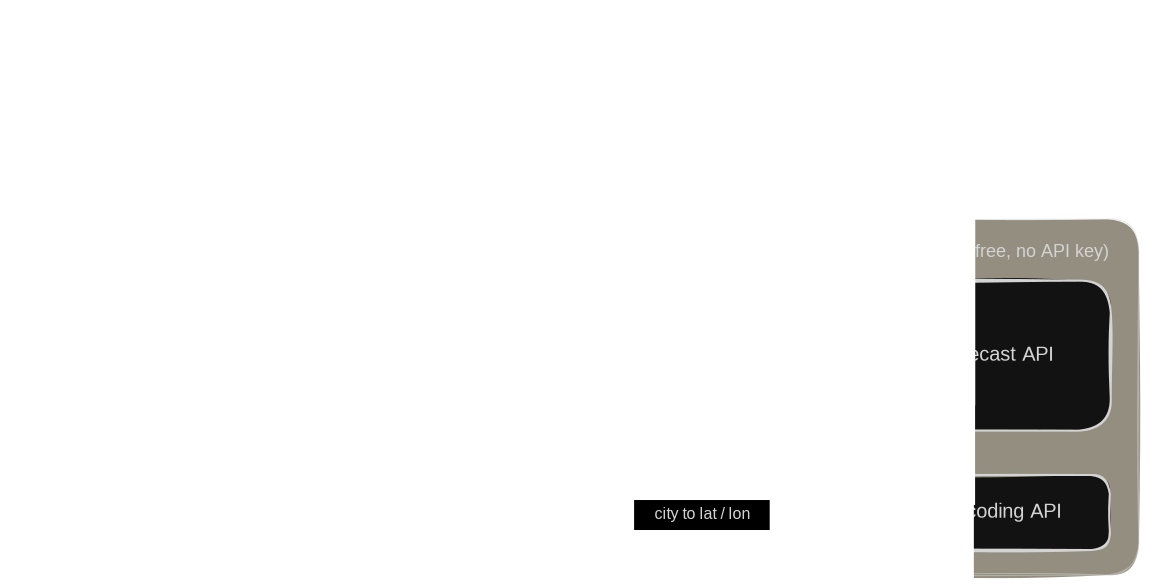
So let’s give the agent what it needs. In 03-forecast-tool we keep get_weather as it is, and add a second tool, get_forecast, that fetches the daily forecast from Open-Meteo.
This is what our agent looks like once both tools are in place:
Python
Both tools need to look up the coordinates of the city, so we move that part of get_weather into its own helper function, find_city. It is a regular function, not a tool, so the model never sees it:
def find_city(city: str) -> dict | None:
    """Look up a city's coordinates with Open-Meteo's geocoding API."""
    places = fetch_json(
        "https://geocoding-api.open-meteo.com/v1/search", {"name": city, "count": 1}
    ).get("results")
    return places[0] if places else None
Then we add the new tool. The important part is the docstring. It tells the model when to use this tool instead of get_weather, and the days parameter explains how to ask for the right number of days:
@tool
def get_forecast(city: str, days: int = 3) -> str:
    """Get the daily weather forecast for a city, starting with today.

    Use this for questions about tomorrow or the coming days.

    Args:
        city: The name of the city, e.g. Lisbon.
        days: Number of days to forecast, from 1 to 16. Day 1 is today, day 2 is tomorrow.
    """
The body looks a lot like get_weather. The difference is that we ask Open-Meteo for daily values instead of current, and pass on the number of days:
    place = find_city(city)
    if not place:
        return f"Could not find a city named {city}."
    forecast = fetch_json(
        "https://api.open-meteo.com/v1/forecast",
        {
            "latitude": place["latitude"],
            "longitude": place["longitude"],
            "daily": "weather_code,temperature_2m_max,temperature_2m_min,"
            "precipitation_sum,precipitation_probability_max",
            "forecast_days": days,
            "timezone": "auto",
        },
    )
    return json.dumps({"city": place["name"], "country": place.get("country"), **forecast})
Finally, we give the agent both tools:
agent = Agent(tools=[get_weather, get_forecast])
See the full example in the labs repository.
TypeScript
In TypeScript we do the same thing, and move the city lookup into a findCity helper function:
async function findCity(city: string) {
  const { results } = await fetchJson('https://geocoding-api.open-meteo.com/v1/search', {
    name: city,
    count: 1,
  });
  return results?.[0];
}
Then we add the new tool. The description tells the model when to use it, and the Zod schema for days tells it how many days to ask for. We also use Zod to limit days to between 1 and 16, which is what Open-Meteo supports, and give it a default value of 3:
const getForecast = tool({
  name: 'get_forecast',
  description:
    'Get the daily weather forecast for a city, starting with today. ' +
    'Use this for questions about tomorrow or the coming days.',
  inputSchema: z.object({
    city: z.string().describe('The name of the city, e.g. Lisbon.'),
    days: z
      .number()
      .int()
      .min(1)
      .max(16)
      .default(3)
      .describe('Number of days to forecast. Day 1 is today, day 2 is tomorrow.'),
  }),
The callback asks Open-Meteo for daily values instead of current, and passes on the number of days:
  callback: async ({ city, days }) => {
    const place = await findCity(city)
    if (!place) return `Could not find a city named ${city}.`
    const forecast = await fetchJson('https://api.open-meteo.com/v1/forecast', {
      latitude: place.latitude,
      longitude: place.longitude,
      daily:
        'weather_code,temperature_2m_max,temperature_2m_min,' +
        'precipitation_sum,precipitation_probability_max',
      forecast_days: days,
      timezone: 'auto',
    })
    return JSON.stringify({ city: place.name, country: place.country, ...forecast })
  },
})
Finally, we give the agent both tools:
const agent = new Agent({ tools: [getWeather, getForecast] });
See the full example in the labs repository.
Most of the work is in the description. “Use this for questions about tomorrow or the coming days” tells the model when to pick this tool over get_weather, and “Day 1 is today, day 2 is tomorrow” tells it how many days to ask for. We never write code that decides which tool to call. The model does that from the descriptions.
Asking about the weekend again
The umbrella question that our agent had to guess on is now the default prompt:
python main.py          # Python
npm start               # TypeScript
Let me check the forecast for Lisbon over the coming days! Tool #1: get_forecast Good news — your trip to Lisbon this weekend is looking mostly dry! Here’s a summary:
| Day | Condition | Max Temp | Rain Chance |
|---|---|---|---|
| Friday (Oct 24) | Cloudy | 22°C | 0% |
| Saturday (Oct 25) | Cloudy | 23°C | 0% |
| Sunday (Oct 26) | Foggy | 22°C | 0% |
| Monday (Oct 27) | Light Rain | 22°C | 13% |
The weekend itself (Saturday & Sunday) looks dry with no rain expected. There’s a very slight chance (13%) of a light shower on Monday, but even then the predicted rainfall is minimal (0.6mm).
You probably don’t need an umbrella, but if you’re staying into Monday or tend to be cautious, a compact travel umbrella wouldn’t hurt. Enjoy Lisbon! 🌤️
This time the model picks get_forecast instead of get_weather, and bases its answer on the actual forecast instead of a guess.
If you look closely, there is a mistake in the answer though. October 24, 2026 is a Saturday, not a Friday. The forecast data from Open-Meteo only contains dates, and the model doesn’t know what day it is today, so it got the weekdays wrong. Again, the model only knows what it learned during training and what its tools give it.
We can also ask a question that needs both tools:
python main.py "What is it like in Lisbon right now, and will it rain this weekend?"          # Python
npm start -- "What is it like in Lisbon right now, and will it rain this weekend?"            # TypeScript
I’ll check both the current weather in Lisbon and the forecast for this weekend at the same time! Tool #1: get_weather
Tool #2: get_forecast Here’s the full weather picture for Lisbon:
Right Now 🌤️
- Temperature: 19°C
- Conditions: Mainly clear skies
- Precipitation: None
- Wind: 14.7 km/h
It’s a pleasant autumn day in Lisbon!
This Weekend (Saturday 25th & Sunday 26th) 🗓️
| Day | Conditions | High / Low | Rain Chance |
|---|---|---|---|
| Saturday (Oct 25) | Overcast/Cloudy | 23°C / 11°C | 0% |
| Sunday (Oct 26) | Foggy | 22°C / 13°C | 0% |
No rain expected this weekend! 🎉 While it may be a bit cloudy or foggy, you can largely leave the umbrella at home. Temperatures will be mild and comfortable, making it a great weekend to enjoy the city.
Do note that Monday (Oct 27) has a slight 13% chance of a small amount of rain (0.6mm), so just something to keep in mind if your plans extend into early next week.
This is the agent loop from the first post in action. The model figured out that the question has two parts and asked for both tools in the same step. Strands ran both tools and sent the results back, and the model used them to write the final answer. We didn’t code any of those steps. We gave the agent two tools with clear descriptions, and the model worked out the rest.
The agent doesn’t remember anything
Our agent can now fetch live data, and pick the right tool for the job. But let’s see what happens when we have a conversation with it. First we tell it about our trip:
python main.py "I'm going to Lisbon this weekend, and I'd like to spend as much time outside as possible."          # Python
npm start -- "I'm going to Lisbon this weekend, and I'd like to spend as much time outside as possible."            # TypeScript
Let me get the forecast for Lisbon over the next few days to help you plan! Tool #1: get_forecast Here’s the Lisbon weekend forecast to help you plan your outdoor time:
| Day | Condition | High / Low | Rain Chance |
|---|---|---|---|
| Saturday (Oct 25) | Overcast | 23°C / 11°C | 0% |
| Sunday (Oct 26) | Foggy | 22°C / 13°C | 0% |
The good news is that both days look dry with zero chance of rain, so you should be able to spend plenty of time outdoors! Here are a few things to keep in mind:
- 🌥️ Saturday will be mostly overcast but warm, reaching a pleasant 23°C — great for exploring parks, viewpoints (miradouros), and riverside areas.
- 🌫️ Sunday may start foggy, with a slightly cooler high of 22°C, but still very comfortable and dry.
- 🧥 Mornings and evenings will be cooler (11–13°C), so bring a light jacket for when the sun goes down.
Overall, it’s a great weekend to be outside in Lisbon! Enjoy your trip! 🌇
The agent understood what we wanted, and went straight for the forecast. Now let’s ask a follow-up question:
python main.py "Which day of my trip is best for being outside?"          # Python
npm start -- "Which day of my trip is best for being outside?"            # TypeScript
I’d be happy to help you find the best day for outdoor activities during your trip! Could you please provide me with:
- The city you’re traveling to?
- The dates of your trip (or how many days)?
The agent has no idea what trip we are talking about. Every time we run the script, we create a brand new agent, and it starts with a blank slate. Everything we told it in the previous run is gone.

To be useful, an agent needs to remember both the conversation it is having right now and what it has learned about us over time.
Wrap-up
I’m glad you made it to the end!
We’ve installed Strands Agents, built our first agent, and seen how far a model gets on its own. Then we gave it a weather tool and a forecast tool, and watched the model pick the right one, and even call both in the same step, without us writing any code that decides which tool to use. Along the way we also saw that the agent is limited by its tools, and that the model only knows what it learned during training and what its tools give it.
In the next post we’ll fix the last problem we ran into, and give our agent memory, so it can remember our trip to Lisbon. I hope you’ll join me!
Thanks for reading!