
Hello again, and welcome to the fourth post in my Strands Agents series. In the previous post our agent got a memory. It remembers the conversation within a session, and it remembers that we like to spend our trips outside, across all sessions.
But there’s one thing it still gets wrong, and it has done so in both of the last two posts. When we planned Porto, it told us Saturday was November 8. November 8 was a Sunday. It also suggested Tuesday, November 4, which was a Wednesday. The forecast itself was right. The weekdays were made up.
In this post we’ll fix that, and on the way we’ll look at what’s behind it. The model only knows what we show it, and what we show it has a name: the context. We’ll build three labs, each giving the agent today’s date in a different way, and by the end you’ll know when to reach for which.
What is context?
The model behind our agent knows two things: what it learned in training, and what we send it when we call it. The training is frozen at a cutoff date, long before today. Everything else has to come with the call, and everything we send with the call is the context.
In our agent the context is made of a few parts:
- The system prompt, which tells the model who the agent is and how it should answer. We wrote our first one in the last post, telling the agent to use its memory.
- The tool descriptions, so the model knows which tools it can ask for, and when.
- The conversation: our messages, the model’s answers, and the results of every tool call. With session memory, this is what gets saved and loaded again.
- Anything else we add ourselves. We’ll get to that later in the post.
You might know the old story about the blind men and the elephant. Here’s a version of it. A group of people stand around an elephant, each looking at it through their own small frame. One sees the trunk and says it’s a snake. One sees a leg and says it’s a tree. One sees the ear and says it’s a big fan. They’re all describing the same elephant, and they’re all wrong, because none of them sees the whole thing.
The model is like one of them. It sees what’s inside its frame, and it describes the world from that. If today’s date isn’t inside the frame, the model doesn’t know it. It can’t look outside the frame. What it does instead is guess, and like us humans, it will happily give you the guess with a straight face.
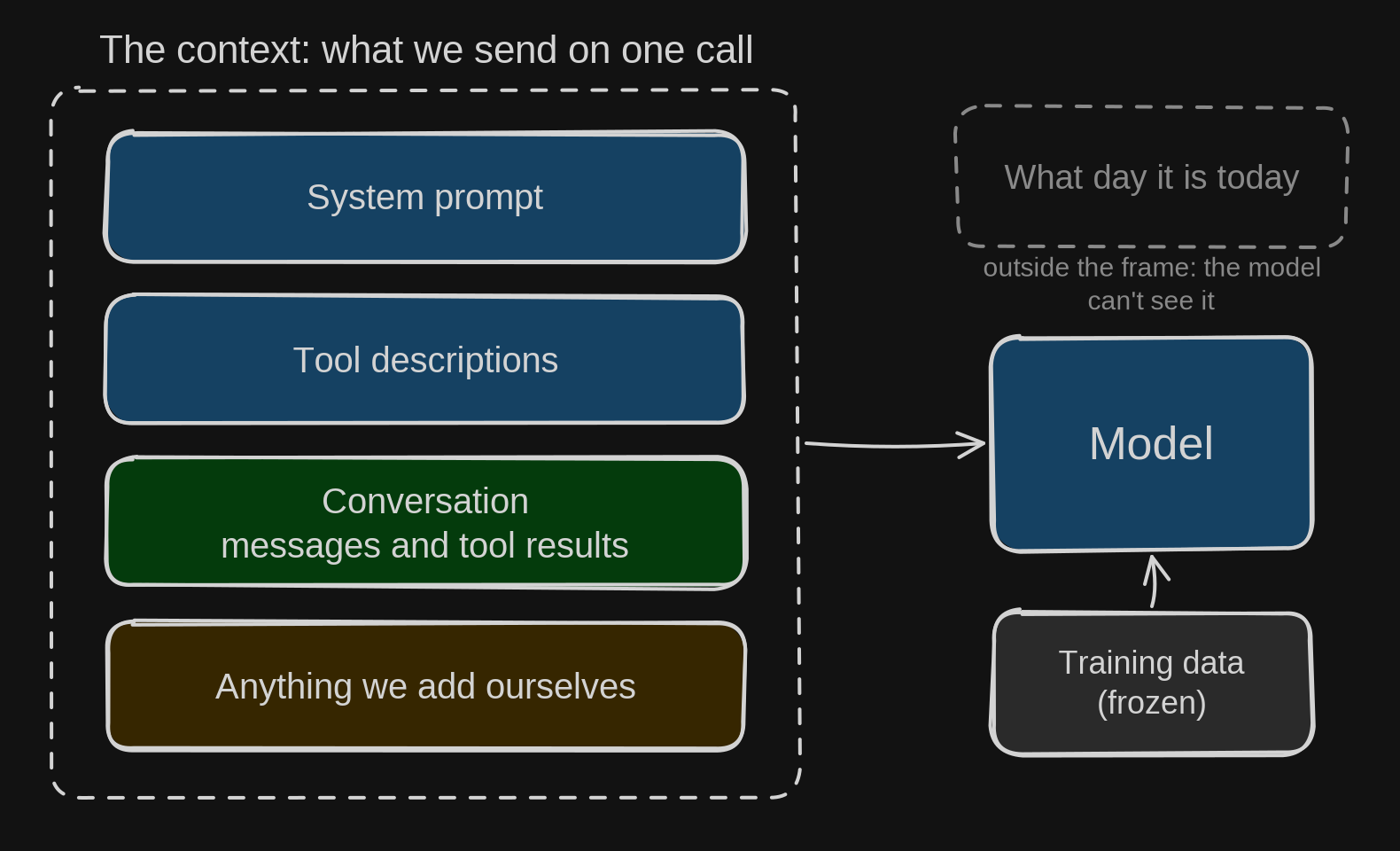
The frame is also limited in size. The model can only take in a certain amount of text per call, and we pay for every bit of it, on every call. So we can’t just throw everything in there. The work is in deciding what goes inside the frame, and when.
Why the weekdays were wrong
Let’s look at what the forecast tool gives the model. Open-Meteo returns the forecast with dates like 2026-11-14, but no weekdays. To say “Saturday” the model has to work out which day of the week 2026-11-14 is, and to know what “this weekend” means, it has to know what today is.
Nothing in the context tells it either of those. The system prompt is about trips and memory, the tools are about weather, and our message says “this weekend”. So the model guesses, and sometimes it guesses wrong.
The runs in this post were made on Friday, November 13, so “this weekend” means Saturday the 14th and Sunday the 15th. Here’s the agent from the last post, from 06-shared-memory, with a fresh session and memory:
python main.py lisbon "I'm going to Lisbon this weekend. When I travel, I like to spend as much time outside as possible."          # Python
npm start -- lisbon "I'm going to Lisbon this weekend. When I travel, I like to spend as much time outside as possible."            # TypeScript
Tool #1: add_memory
Tool #2: get_forecast I’ve saved your outdoor preference for future trips! Now, here’s the weekend forecast for Lisbon:
| Day | Condition | High / Low | Rain Chance |
|---|---|---|---|
| Saturday (Nov 15) | 🌧️ Rain showers | 18°C / 15°C | 62% |
| Sunday (Nov 16) | 🌧️ Light rain | 20°C / 17°C | 42% |
…
Saturday is the 14th, not the 15th. The model thought the weekend was one day later than it is, so what it calls Saturday is really Sunday’s forecast, and what it calls Sunday is Monday’s. It even tells us Sunday is the best day to be outside, based on Monday’s weather. With a straight face, as usual.
The fix is to put today’s date inside the frame. There’s more than one way to do that, so let’s try three.
A tool for today’s date
We’ve given the agent tools for everything else it needed to know, so let’s start there. The lab for this is in 07-today-tool. It’s the agent from the last post, with session memory and shared memory, and a third tool.
Python
The tool has no arguments, and returns today’s date with the day of the week:
from datetime import date

@tool
def get_today() -> str:
    """Get today's date and the day of the week."""
    today = date.today()
    return f"Today is {today:%A} {today.day} {today:%B %Y}."
Then we add it to the agent’s tools:
agent = Agent(
    system_prompt=SYSTEM_PROMPT,
    tools=[get_today, get_weather, get_forecast],
    session_manager=session_manager,
    memory_manager=memory_manager,
)
See the full example in the labs repository.
TypeScript
In TypeScript the tool takes an empty input schema, since there’s nothing to ask for:
const getToday = tool({
  name: 'get_today',
  description: "Get today's date and the day of the week.",
  inputSchema: z.object({}),
  callback: () => {
    const today = new Date();
    const readable = today.toLocaleDateString('en-GB', {
      weekday: 'long',
      day: 'numeric',
      month: 'long',
      year: 'numeric',
    });
    return `Today is ${readable}.`;
  },
});
And we add it to the tools, just like in Python:
const agent = new Agent({
  systemPrompt: SYSTEM_PROMPT,
  tools: [getToday, getWeather, getForecast],
  sessionManager,
  memoryManager,
});
See the full example in the labs repository.
Does it know what day it is?
Each lab starts with no sessions and no memory, so we run the same Lisbon prompt again:
Tool #1: add_memory
Tool #2: get_today
Tool #3: get_forecast Great news — I’ve saved your outdoor preference for future trips! Here’s the Lisbon weekend forecast:
| Day | Conditions | High / Low | Rain Chance | Rainfall |
|---|---|---|---|---|
| Friday | Partly cloudy | 19° / 16°C | 65% | 0.2 mm |
| Saturday | Light showers | 19° / 15°C | 53% | 1.0 mm |
| Sunday | Light showers | 18° / 15°C | 62% | 3.6 mm |
Here’s the outdoor-focused take:
- 🌤️ Friday is your best bet for outdoor activities. Temperatures are pleasant (~19°C) and rainfall is minimal (0.2 mm), even if there’s some cloud cover.
- 🌦️ Saturday has a moderate chance of showers, but rainfall is still light (1.0 mm). You could enjoy outdoor time between spells — just pack a light jacket!
- 🌧️ Sunday is the trickiest day, with the most rainfall (3.6 mm) and a 62% chance of rain. It might be worth keeping some indoor backup plans ready.
Tips for maximizing your time outside:
- Plan your biggest outdoor activities (like exploring Belém, Alfama, or the viewpoints/miradouros) for Friday and Saturday morning.
- Carry a compact umbrella or light rain jacket throughout the weekend.
- Lisbon’s many covered patios and outdoor cafés are a great way to stay “outside” even if it drizzles!
Have a wonderful trip! 🌟
Friday, Saturday and Sunday, and this time they’re the right ones. The agent saved our preference, asked for today’s date, and then fetched the forecast. “Great news” is back too, but at least this time it’s followed by light showers and not thunderstorms.
It works, but notice what it took. The model had to decide by itself that it needed the date, and spend a tool call to get it. Here it did, in both Python and TypeScript. But giving the model a tool doesn’t mean it will use it. The date only lands inside the frame if the model thinks to ask for it, and every time it asks, that’s one more step in the agent loop.
For something the agent needs on almost every question, there’s a more direct way.
Today’s date in the system prompt
The system prompt is part of the context on every single call. If we put the date there, the model sees it without having to ask. The lab for this is in 08-system-prompt, and it’s the agent from the last post again, without the get_today tool.
Python
We write a small helper for the date, and add it to the end of the system prompt when we create the agent:
def today() -> str:
    """Today's date and day of the week, e.g. Friday 13 November 2026."""
    now = date.today()
    return f"{now:%A} {now.day} {now:%B %Y}"


agent = Agent(
    system_prompt=f"{SYSTEM_PROMPT}\nToday is {today()}.",
    tools=[get_weather, get_forecast],
    session_manager=session_manager,
    memory_manager=memory_manager,
)
See the full example in the labs repository.
TypeScript
The same in TypeScript:
function today() {
  return new Date().toLocaleDateString('en-GB', {
    weekday: 'long',
    day: 'numeric',
    month: 'long',
    year: 'numeric',
  });
}

const agent = new Agent({
  systemPrompt: `${SYSTEM_PROMPT}\nToday is ${today()}.`,
  tools: [getWeather, getForecast],
  sessionManager,
  memoryManager,
});
See the full example in the labs repository.
Same trip, no extra tool call
We run the same prompt as before:
Tool #1: add_memory
Tool #2: get_forecast I’ve saved your preference for outdoor activities! Here’s the weekend forecast for Lisbon:
| Day | Condition | High / Low | Rain Chance | Rainfall |
|---|---|---|---|---|
| Friday (today) | Partly cloudy | 19° / 16°C | 65% | 0.2 mm |
| Saturday | Light showers | 19° / 15°C | 53% | 1.0 mm |
| Sunday | Light showers | 18° / 15°C | 62% | 3.6 mm |
Here’s what this means for your outdoor plans:
- 🌤️ Today (Friday) is your best bet for being outside. It’s warm and pleasant, and even though there’s a 65% chance of rain, the expected rainfall is minimal (0.2 mm). Make the most of the afternoon! …
The weekdays are right, there’s no get_today call, and it even knows Friday is today, since the date was in the frame from the start.
When the system prompt gets old
There’s a catch, and it’s in the words “when we create the agent”. The date is written into the system prompt once. Our script creates a new agent every time we run it, so for us the date is always fresh. But imagine the agent running in a server that started on Friday. On Monday it would still tell the model that today is Friday, and we’re back to guessing, only now the model is guessing with confidence.
And in TypeScript there’s one more thing. The TypeScript session manager saves the system prompt in the session, and when we load the session again, the saved system prompt comes back with it. This is from sessions/ after our run:
"systemPrompt": "You help people plan their trips around the weather.\n...\nToday is Friday, 13 November 2026."
So if we came back to the Lisbon session next week, the agent would load the old system prompt over the new one, and today would still be Friday the 13th. Spooky, but true. The Python session manager doesn’t save the system prompt, so in Python a new run gets the new date. That’s a difference between the two SDKs worth knowing about for any system prompt you plan to change, not only one with a date in it.
The system prompt is the right place for things that don’t change: who the agent is and how it should behave. Today’s date changes every day.
A context injector
What we want is for the date to be worked out fresh every time the model is called, without the model having to ask, and without it being saved anywhere. Strands has a plugin for exactly that, called ContextInjector. Before each model call, it asks us for some text, and adds it to what the model sees for that one call.
The lab for this is in 09-context-injector. It’s the agent from the last post again, with the original system prompt and no get_today tool.
Python
We import the ContextInjector, give it a function that returns the text to add, and hand it to the agent as a plugin:
from strands.vended_plugins.context_injector import ContextInjector

today_injector = ContextInjector(lambda context: f"<today>{today()}</today>", trigger="everyTurn")

agent = Agent(
    system_prompt=SYSTEM_PROMPT,
    tools=[get_weather, get_forecast],
    session_manager=session_manager,
    memory_manager=memory_manager,
    plugins=[today_injector],
)
The <today> tags aren’t anything special to Strands. They just make it clear to the model what the text is, and where it starts and ends. We’ll come back to trigger="everyTurn" in a moment, because it matters more than it looks.
See the full example in the labs repository.
TypeScript
In TypeScript the function is called renderContent, and it’s async:
import { ContextInjector } from '@strands-agents/sdk/vended-plugins/context-injector';

const todayInjector = new ContextInjector({
  renderContent: async () => `<today>${today()}</today>`,
  trigger: 'everyTurn',
});

const agent = new Agent({
  systemPrompt: SYSTEM_PROMPT,
  tools: [getWeather, getForecast],
  sessionManager,
  memoryManager,
  plugins: [todayInjector],
});
See the full example in the labs repository.
Fresh every time
Same prompt again:
Tool #1: add_memory
Tool #2: get_forecast I’ve saved your outdoor preference for future trips! Here’s the Lisbon weekend forecast:
| Day | Conditions | High/Low | Rain Chance |
|---|---|---|---|
| Saturday 14 Nov | Light showers 🌦️ | 19° / 15°C | 53% |
| Sunday 15 Nov | Light showers 🌦️ | 18° / 15°C | 62% |
Unfortunately, the weekend isn’t looking ideal for an outdoor lover — both days have a moderate chance of rain with some light showers expected. That said, it’s still quite mild and warm for November (around 18–19°C), so it’s far from a washout! …
Saturday the 14th and Sunday the 15th, with the right forecast on each, and no extra tool call. This time it left Friday out, which is fair, since we asked about the weekend. From the outside it looks a lot like the last lab, so let’s look at where the date went.
The injector adds the date to the end of our latest message, but only in the copy that’s sent to the model. The conversation the agent keeps, and saves to the session, never gets it. If we search the sessions/ folder for the date after the run, there’s nothing there, in Python or TypeScript. Next time the model is called, the date is worked out again, so a server that started on Friday would say Monday on Monday.
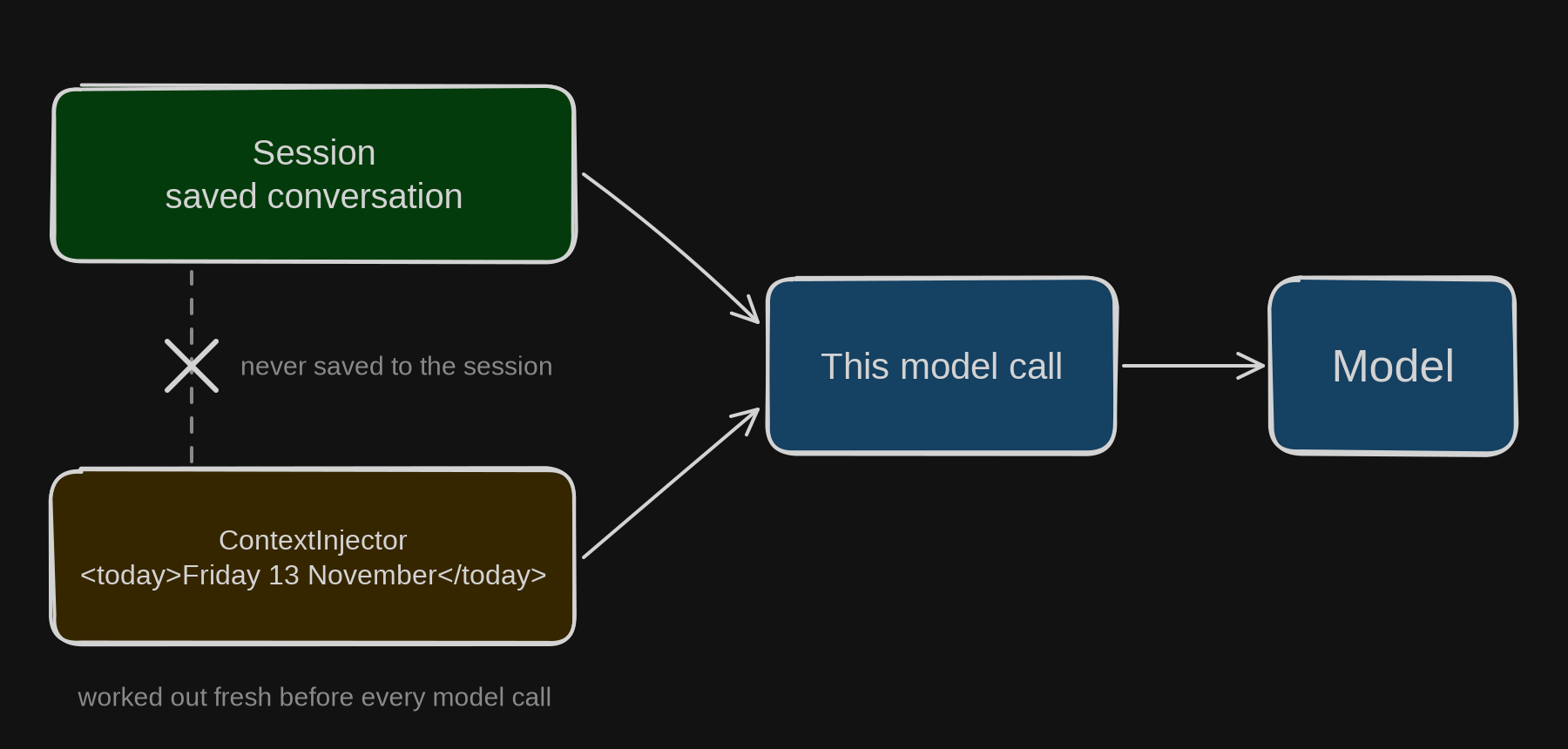
Now, about that trigger. By default the injector only adds its text when the latest message is a new question from us. Remember the agent loop from the first post: the model asks for a tool, the agent runs it, and the model is called again with the tool result. On that second call the latest message is a tool result, not a question from us, so by default the date isn’t added. And the second call is the one where the model reads the forecast and writes the weekdays.
We found this out the hard way. With the default trigger, we asked about Porto next weekend, and the agent gave us a table with “Sat 22 Nov” and “Sun 21 Nov”. A small middleware that printed whether <today> was in the context showed it clearly: the date was there on the first model call, and gone on the second. With everyTurn the date is added on every call to the model, and the weekdays were right again.
The default makes sense for a chat agent that doesn’t need the context in the middle of the loop. But if the model needs the context to make sense of what the tools give back, like a date to go with a forecast, everyTurn is the one you want.
It’s also not the only thing in Strands that works like this. The memory manager from the last post does the same with memory. With injection turned on, which is the default, it searches the memory before each call and adds what it finds to the context. In lab 06 we turned that off with injection=False, and let the agent search the memory with the search_memory tool when it thought it needed to. That’s the same choice we’ve made in this post, a tool or an injector, just for memory instead of a date.
Tool, system prompt or context injector?
Each of the three puts the date in the frame, but at a different time, and someone different decides when.
| Approach | Who decides | When it’s added | Saved in the session |
|---|---|---|---|
| Tool | The model | When the model asks for it | Yes, as a tool result |
| System prompt | Us | Once, when the agent is created | In TypeScript, yes |
| Context injector | Us | Before each model call | No |
A tool is the right choice for things the agent only needs now and then, and where the model can tell when it needs them, like the weather for a city. The system prompt holds what stays the same from one call to the next. And the context injector is for things that change, but that the agent needs every time, like what day it is.
If you read the first post in the series, you might remember hooks from the list of building blocks in the Harness SDK, and wonder why we didn’t use one here. Hooks let us react to what happens in the agent loop, but changing what the model sees on each call is the job of middleware, and the context injector is built on exactly that. We’ll get our hands on hooks in a later post.
Conclusion
Who knew that telling an agent what day it is could take three labs?
We started with an agent that got the weekdays wrong, and found out why: the model can only see what’s inside its frame, and today’s date wasn’t in there. A tool let the model ask for the date, at the cost of an extra step and the model having to think of it. The system prompt put the date in the frame from the start, but it only gets written once, and in TypeScript it’s saved with the session. And the context injector adds a fresh date to every call, without saving it anywhere, as long as we tell it that every call means every call.
Context is a lot more than the date, of course. It’s everything our agent knows when it answers us, and most of building an agent is deciding what goes in the frame, and what stays out. We’ll keep coming back to that as the series goes on, and I hope you’ll come along for it.
Thanks for spending some of your time here. Until next time, have a great weekend, whichever day it starts on!